Scope: This post builds a 2D SDF rendering implementation in C from scratch — no graphics library, no image format beyond PPM, no dependencies outside the C standard library. Every concept is covered step by step with the code that produces visible output. 3D SDFs and GPU shader ports are not covered; the focus is the mathematical foundation that applies to both.
Introduction#
The technique behind Valve's font renderer and every GPU shader that draws a rounded button without a texture (see Inigo Quilez's 2D SDF primitives) is the same primitive: a signed distance field. An SDF is a scalar function over 2D (or 3D) space that returns the signed distance from any point to the nearest surface — negative inside, zero on the boundary, positive outside.
The sign is what makes it powerful. Every pixel knows not just whether it's inside or outside a shape, but exactly how far from the edge it is. That sub-pixel information is the foundation for everything that follows: anti-aliasing, boolean compositing, smooth morphing, and glow effects.
Output format: PPM#
Before any rendering, the question is: how do you write an image from C with no dependencies? The answer is PPM (Portable Pixel Map) — the simplest image format that actually works.
The full spec:
- Write a text header:
P6 <width> <height> 255\n - Write raw RGB bytes — one triplet per pixel, left to right, top to bottom
That's the entire format. No compression, no checksums, no chunk parsing. The implementation reflects that:
typedef struct
{
uint8_t r;
uint8_t g;
uint8_t b;
} rgb;
void save_as_ppm(const char *path, rgb *pixels, size_t width, size_t height)
{
FILE *fp = fopen(path, "wb");
if (fp == NULL)
{
fprintf(stderr, "Failed to open file '%s', error: %s", path, strerror(errno));
return;
}
fprintf(fp, "P6 %zu %zu 255\n", width, height);
if (fwrite(pixels, sizeof(rgb), width * height, fp) < width * height)
{
fprintf(stderr, "Failed to write pixels to file '%s', error: %s", path, strerror(errno));
return;
}
if (fclose(fp) == EOF)
{
fprintf(stderr, "Failed to close file '%s', error: %s", path, strerror(errno));
return;
}
printf("Generated '%s'!\n", path);
}Note
A 512×512 PPM file is a 15-byte header followed by 786,432 bytes of pixel data. Compare that to PNG, which requires zlib compression, CRC32 checksums, and multiple chunk types (IHDR, IDAT, IEND). PPM has none of that overhead — which is exactly why it's the right output format for a renderer where you want the interesting work to be the algorithms, not the I/O.The canvas is a flat rgb array in row-major order. A pixel at column x, row y lives at pixels[y * width + x].
Signed distance fields#
An SDF f(px, py) returns a float: the signed distance from point (px, py) to the nearest point on a shape's boundary. The convention:
f < 0— inside the shapef = 0— on the boundaryf > 0— outside the shape
The circle is the canonical example. The signed distance from any point to a circle of radius r centered at (cx, cy) is the distance to the center minus r:
float sdf_circle(float px, float py, float cx, float cy, float r)
{
return sqrtf((px - cx) * (px - cx) + (py - cy) * (py - cy)) - r;
}If you're 80 units from a circle of radius 100, you're 20 inside: f = 80 − 100 = −20. At 120, you're 20 outside: f = 20. On the boundary: f = 0 exactly.
A hard threshold render — foreground where d <= 0, background otherwise — produces a filled circle:
void circle_hard(rgb *pixels, size_t width, size_t height, rgb bg, rgb fg)
{
for (size_t y = 0; y < height; ++y)
{
for (size_t x = 0; x < width; ++x)
{
float d = sdf_circle(x, y, width / 2.0f, height / 2.0f, width / 4.0f);
pixels[y * width + x] = d <= 0 ? fg : bg;
}
}
}The result on a 512×512 canvas:

Staircase aliasing at the edge is visible. Each pixel is binary — fully in or fully out. But the SDF already computed the sub-pixel distance to the boundary. Throwing it away with a hard threshold is wasteful.
Anti-aliasing with smoothstep#
smoothstep(edge0, edge1, t) maps t to a smooth 0→1 transition between edge0 and edge1, using a cubic ease curve that has zero slope at both endpoints:
float smoothstep(float edge0, float edge1, float t)
{
t = clamp((t - edge0) / (edge1 - edge0), 0, 1);
return t * t * (3 - 2 * t);
}For edge anti-aliasing, pixels within 1 unit of d = 0 blend between background and foreground. smoothstep(1.0, -1.0, d) gives alpha 0 one unit outside, alpha 1 one unit inside, and a smooth ramp in between. lerp_color blends between two RGB colors based on a weight t where t ∈ [0, 1]. When t = 0 the result is color a, when t = 1 the result is color b, and for values 0 < t < 1 the colors blend proportionally:
rgb lerp_color(rgb a, rgb b, float t)
{
t = clamp(t, 0.0f, 1.0f);
return (rgb){
.r = (uint8_t)((float)a.r * (1.0f - t) + (float)b.r * t + 0.5f),
.g = (uint8_t)((float)a.g * (1.0f - t) + (float)b.g * t + 0.5f),
.b = (uint8_t)((float)a.b * (1.0f - t) + (float)b.b * t + 0.5f),
};
}
rgb smooth(float d, rgb bg, rgb fg)
{
float alpha = smoothstep(1.0f, -1.0f, d);
return lerp_color(bg, fg, alpha);
}Tip
We lerp in sRGB space for simplicity; rendering in linear space would be more physically accurate but requires converting raw bytes to linear values before blending, then back to sRGB. The difference is subtle for most SDFs but matters for glows and soft shadows in physically-based rendering.The difference compared to the hard-threshold version:

Tip
This anti-aliasing is analytically exact, not an approximation. The SDF already computed the sub-pixel distance;smoothstep maps it directly to coverage. MSAA approximates coverage by shooting multiple rays per pixel. SDF rendering computes coverage in closed form — no supersampling required.Box and rounded box#
Every shape has a distance formula. The box SDF uses a fold-and-measure approach: fold the plane into one quadrant with fabsf, then measure how far outside each extent the point is:
float sdf_box(float px, float py, float cx, float cy, float hw, float hh)
{
float qx = fabsf(cx - px) - hw;
float qy = fabsf(cy - py) - hh;
float ex = MAX(qx, 0);
float ey = MAX(qy, 0);
float outside = sqrtf((ex * ex) + (ey * ey));
float inside = MIN(MAX(qx, qy), 0);
return outside + inside;
}qx and qy are the signed distances to the nearest x and y extents — positive means you've passed the wall, negative means you're inside it. Three cases:
- Both negative (interior): You're inside the box on both axes.
outside = 0(no corner involved).inside = MIN(MAX(qx, qy), 0)picks the boundary closest to you (least negative) and keeps it negative — the distance to the nearest wall, from inside. - One positive (on a face): You're outside on one axis, inside the other. That positive value becomes
outside(distance to that face). The negative value clamps to 0 ininside. - Both positive (corner region): You're outside on both axes.
outside = sqrt(qx² + qy²)is the Euclidean distance to the corner. Both values clamp to 0 ininside.
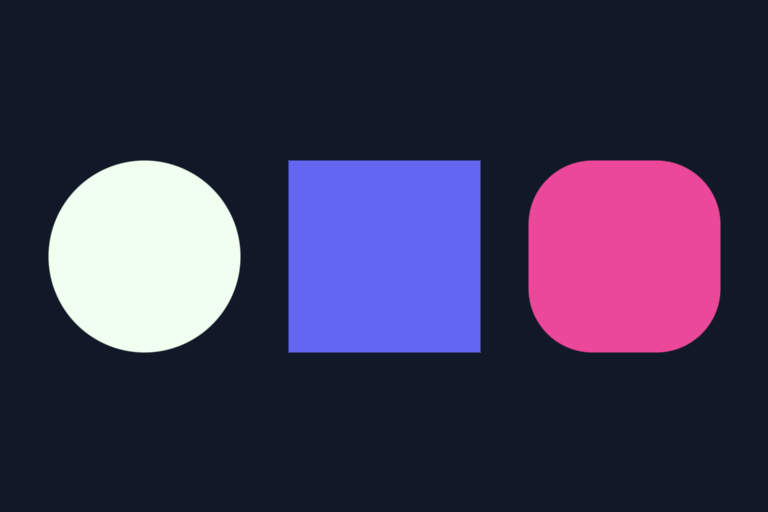
A rounded box is sdf_box - r. Subtracting a constant from a distance function shrinks the surface inward by that amount — which rounds corners by exactly r pixels:
Boolean operations#
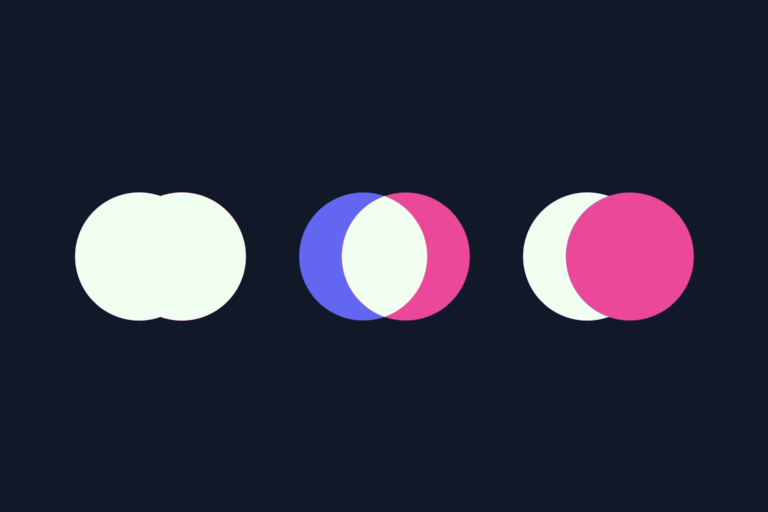
SDF shapes compose algebraically. Three operations cover the full boolean algebra:
float sdf_union(float a, float b)
{
return MIN(a, b);
}
float sdf_intersection(float a, float b)
{
return MAX(a, b);
}
float sdf_subtraction(float a, float b)
{
return MAX(a, -b);
}The intuition behind each:
| Operation | Logic | Meaning |
|---|---|---|
| Union | min(a, b) |
Distance to whichever surface is closer. Include both shapes. |
| Intersection | max(a, b) |
Only where both shapes are inside (both distances negative). The maximum of two negatives picks the tighter constraint. |
| Subtraction | max(a, -b) |
Inside shape A, outside shape B. Inverting B maps inside-B to positive, excluding it from the result. |
The correctness of each follows from the definition of distance. For union, the distance to the union is the distance to whichever surface is closer — a simple min. For intersection, a point is inside the intersection only when it's inside both shapes (both distances negative). The maximum of two negatives is the one closer to zero, which is the tighter constraint. For subtraction, inverting b with -b maps inside-b to positive distances, so the subtracted region contributes as if it were outside the result.
What makes this remarkable is the lack of indirection. Boolean operations on SDF shapes are three arithmetic functions — no masks, render targets, or clipping regions.
The visualization below shows three examples: indigo and rose shapes (the two inputs) with the honeydew result of each boolean operation.
Smooth union#
Hard union has a sharp crease where two shapes meet — MIN(a, b) is not differentiable at a = b. For organic-looking merges, the polynomial smooth minimum blends the two distances near the junction:
float mix(float a, float b, float t)
{
return a + t * (b - a);
}
float smin(float a, float b, float k)
{
float h = clamp(0.5f + 0.5f * (b - a) / k, 0.0f, 1.0f);
return mix(b, a, h) - k * h * (1 - h);
}k controls the blend radius. When |a - b| > k, the shapes are far enough apart that h clamps to 0 or 1 and smin returns the same result as MIN. Within k units of the junction, the cubic term k*h*(1-h) pulls the boundary inward, creating a smooth merge.
Tip
smin creates geometry that neither input had. The blend region is new surface — not a weighted average of two existing surfaces, but a third shape that smoothly transitions between them. With MIN, two circles either overlap or they don't. With smin, they meld together like water droplets.Rendered side by side with the hard union:
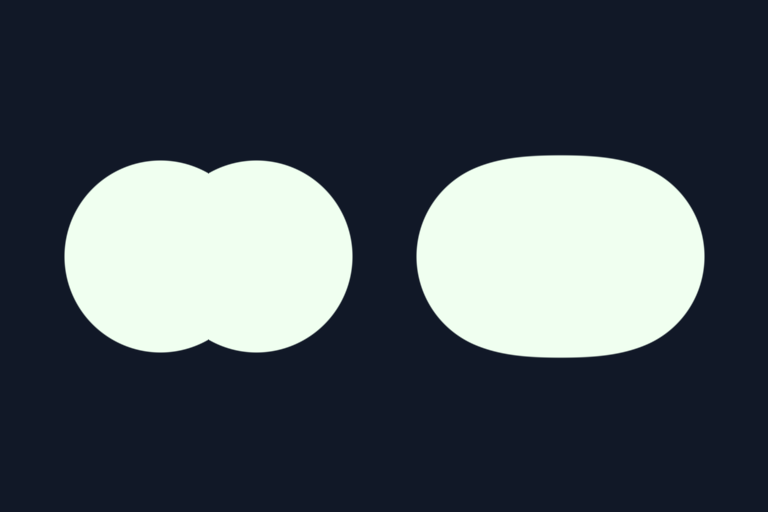
The left half shows sdf_union — a visible crease at the junction. The right shows smin with k = 64 — the circles merge into a single organic shape.
Domain distortion: warping space#
The "magic moment" in SDF graphics is realizing that you can warp space itself before evaluating a distance function — and every pixel still knows the correct signed distance to the distorted surface.
float d = sdf_circle(px + sinf(py * 0.01f) * 20.0f, py, cx, cy, r);A simple sine wave applied to the x-coordinate transforms a circle into a rippled shape with zero extra geometry. The distance field adapts automatically. This works because sdf_circle doesn't care whether its input is the original point or a warped one — it returns the distance from that (possibly transformed) point to the surface.
Rendering works the same as before — smooth() handles the anti-aliased edge, and a smoothstep glow pass renders the falloff around it:
float distorted_px = x + sinf(y * 0.01f) * 20.0f;
float d = sdf_circle(distorted_px, y, cx, cy, radius);
pixels[y * width + x] = smooth(d, bg, fg);
float glow_alpha = smoothstep(radius * 2.0f, 0.0f, d);
rgb glow_color = lerp_color(bg, fg, glow_alpha * 0.3f);
pixels[y * width + x] = lerp_color(pixels[y * width + x], glow_color, glow_alpha * 0.5f);Domain distortion composes with any SDF operation — boolean ops, smooth unions, multi-layer glows. The distortion is just a coordinate transform before the distance call; everything after it is unchanged.
The planet scene#
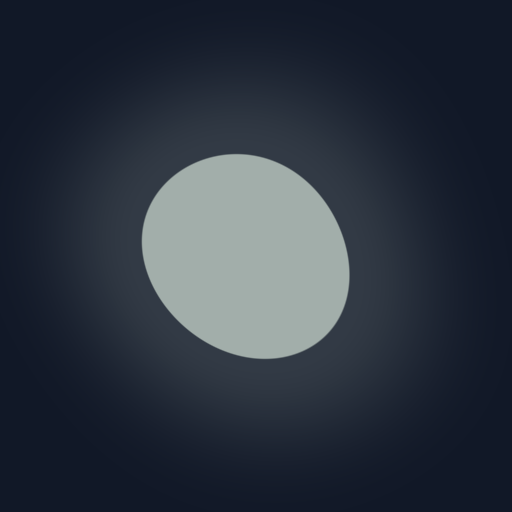
Everything composes in a single pixel loop. The scene uses: a sun with a solar prominence (two circles merged via smin), three planets one of which is ringed (annulus built with sdf_subtraction), and a space station (rounded box body + box solar panels composed via sdf_union).
The glow effect around each body uses multiple smoothstep layers — wide falloff for the outer corona, tighter layers building toward the sharp edge. Here is how the sun is rendered, starting from the smin of the sun body and its solar prominence:
float d_sun = sdf_circle(px, py, cx, cy, sun_r);
float d_prom = sdf_circle(px, py, prom_x, prom_y, prom_r);
float d_sun_full = smin(d_sun, d_prom, sun_k);
color = lerp_color(color, lerp_color(bg, sun_col, 0.06f), smoothstep(sun_r * 3.0f, 0.0f, d_sun_full));
color = lerp_color(color, lerp_color(bg, sun_col, 0.22f), smoothstep(sun_r * 1.5f, 0.0f, d_sun_full));
color = lerp_color(color, lerp_color(bg, sun_col, 0.55f), smoothstep(sun_r * 0.4f, 0.0f, d_sun_full));
color = lerp_color(color, sun_col, smoothstep(1.0f, -1.0f, d_sun_full));The orbital ring on planet three is sdf_subtraction(d_ring_outer, d_ring_inner) — an annulus with no geometry beyond two radius values.

Metaballs animation#
The true power of smin emerges in what it creates between shapes: when two blobs approach each other, they organically merge into one shape. When they separate, they cleanly split into two. Neither input shape has that merged geometry; the polynomial smin creates it on the fly.
This is distinctly SDF-driven. Traditional sprite animation can't do this — you'd need pre-rendered frames for every possible merge state. Only a distance function that continuously interprets space can merge and split geometry per frame.
Four colored blobs orbit the canvas center at different integer speeds (1x, 2x, 3x, 5x rotations per loop), all merged via chained smin:
float d = d1;
d = smin(d, d2, k);
d = smin(d, d3, k);
d = smin(d, d4, k);Colors blend by inverse-distance weighting — each blob's color contributes in proportion to how close the pixel is to that blob's center:
float w1 = 1.0f / (d1 + r + 1.0f);
float w2 = 1.0f / (d2 + r + 1.0f);
float w3 = 1.0f / (d3 + r + 1.0f);
float w4 = 1.0f / (d4 + r + 1.0f);
float total = w1 + w2 + w3 + w4;
rgb col = {
.r = (uint8_t)(c1.r * (w1 / total) + c2.r * (w2 / total) + c3.r * (w3 / total) + c4.r * (w4 / total)),
.g = (uint8_t)(c1.g * (w1 / total) + c2.g * (w2 / total) + c3.g * (w3 / total) + c4.g * (w4 / total)),
.b = (uint8_t)(c1.b * (w1 / total) + c2.b * (w2 / total) + c3.b * (w3 / total) + c4.b * (w4 / total)),
};As blobs approach, their colors merge in the glow. As they separate, the merged geometry splits back into individual shapes:
The animation loop calls the same render function 600 times with t = frame / num_frames stepping from 0 to 1 — each frame is a snapshot of blob positions at that point in the cycle, written to a PPM file. ffmpeg then encodes all 600 frames into an MP4 video using H.264:
ffmpeg -framerate 60 -i output/metaballs_%04d.ppm \
-c:v libx264 -pix_fmt yuv420p -crf 18 -preset slow -movflags faststart output/metaballs.mp4Why SDFs matter#
The reason SDFs are everywhere in modern graphics — GPU shaders, game engines, UI renderers, font rasterizers — is that the representation is algebraic. Shapes are functions. Compositing is arithmetic. Anti-aliasing is a single lookup into something you already computed.
This matters practically. When you read a GLSL shader that draws a rounded button, you'll see sdf_rounded_box, smoothstep, and mix — the same functions from this post, with identical signatures. When you open Shadertoy and see smin blending two spheres, you now know exactly what the polynomial is doing. The C implementation strips away GPU abstractions so the math is visible; the math transfers directly.
A few things worth carrying forward:
The signed value is the interface. Every shape exposes one number — the signed distance to its nearest surface. That single float is enough to compute anti-aliased coverage, build boolean composites, drive glow falloff, and produce smooth morphs. The richness of what you can render comes entirely from how you combine and interpret that one value.
Composition has no architectural cost. Adding a shape to a scene means evaluating one more distance function per pixel — no scene graph, no draw call, no render target, no state change. The entire scene is a single pass over the pixel grid. The cost is purely computational and scales linearly with shape count, which is why GPU BVH structures exist for scenes with hundreds of shapes.
The primitives are complete. Union, intersection, subtraction, and smooth union cover the full boolean algebra of shapes. Every compound shape you've seen in a game HUD or a design tool can be decomposed into these four operations on primitive distance functions.
Resources#
The full source code (~600 lines of C) is on GitHub. Clone it and regenerate everything from scratch — change a radius, a k value, or an orbital speed and see how the output changes.